
myAudi
AudiAuto & Vehicles
4.72.06K Reviews
- Version
- 5.9.0
- Installs
- 1.00M
- Age Rating
- Everyone
Screenshots
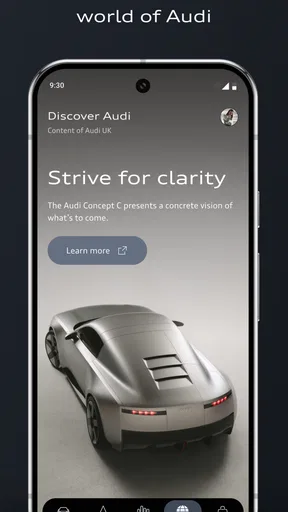
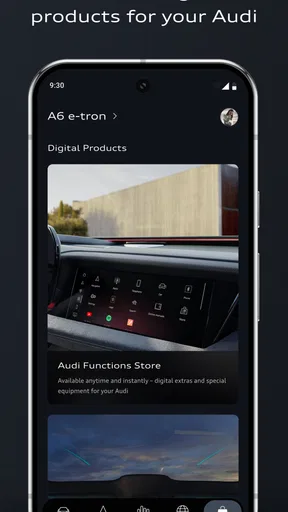
Our Review of myAudi
 Analysis by Appyee
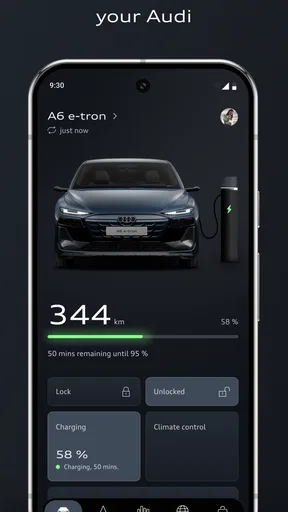
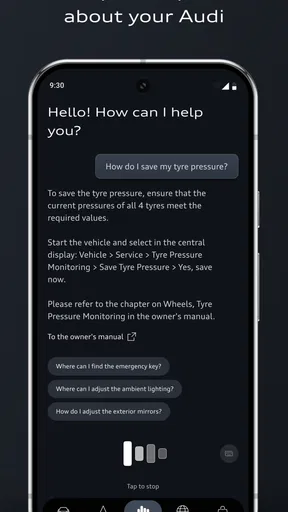
When I think about the gap between owning an Audi and actually managing one day to day, the useful part is rarely the drive itself. It is remembering where the car is, checking whether it is ready, staying on top of maintenance, and finding the right Audi-related information without jumping between unrelated tools. That is the space where myAudi makes sense. It is a free Auto & Vehicles app from Audi, aimed at Audi drivers who want their car-related services and Audi connect services gathered in one place.
I approached it as I would in normal life: start with a car that needs attention, use the app to organize the next step, and see whether the process ends with a genuinely useful outcome or simply another account to maintain. My overall impression is positive. The app feels most valuable when it becomes the first place I check before a journey or a maintenance task. It is less compelling if you only want a basic driving log, a generic navigation tool, or information that does not depend on having an Audi.
From a parked Audi to a clearer next step
The starting condition is familiar. I have parked the car, I am not completely sure whether everything is ready for the next trip, and I would rather check one official source than rely on memory. With myAudi, the first job is to connect my attention to the right vehicle and then understand which services are available for that Audi. That distinction matters because the app is not simply a general motoring utility. Its usefulness is tied to the Audi ownership relationship and to the Audi connect services associated with it.
The account and vehicle setup are therefore more important than they might seem from the short store description. I would not install this expecting an instant, anonymous dashboard. The app is designed around a driver, an Audi, and the services attached to that pairing. Taking a little care during setup pays off later because the information becomes relevant to the car rather than remaining a collection of generic menus.
A practical first session should be unhurried. I would install it, sign in, select or add the relevant vehicle, and then look through the main areas before trying to use the app in a hurry. This is one of my more useful tips: set up the vehicle while the car is parked, not five minutes before leaving. That gives me time to notice whether the services I expect are ready and avoids turning an ordinary trip into a troubleshooting session.
The app is free, which removes the obvious barrier to trying it. It is also rated for Everyone, so the presentation is approachable rather than aimed at a specialist audience. Audi is the developer, and that official connection is one of the app’s strongest practical advantages: I am not translating information from a third-party vehicle tracker into Audi terminology. I am working inside the manufacturer’s own environment.
Following the workflow instead of browsing randomly
Once the vehicle is in place, I would use the app in a simple sequence. First, I check the car-related status or service area that matters for the immediate task. Next, I move to the relevant Audi connect function rather than opening every section at random. Finally, I use the result to decide what to do in the physical world: leave, prepare the car, arrange attention, or look for more information.
That sequence sounds basic, but it is where the app becomes more useful than a collection of disconnected bookmarks. A vehicle app should reduce the number of decisions I make before acting. If I open it with a question such as “Is the car ready?” or “What do I need to do next?”, the interface has a clear job. If I open it without a purpose, the number of available services can make the experience feel less direct.
My preferred routine would be a short pre-drive check. I open the app before walking to the car, review the information that is relevant to the trip, and then close it. I do not need to keep staring at the screen while driving, and I would never treat the phone as a substitute for paying attention to the road. The value is in preparation: checking first, then getting on with the journey.
A second useful workflow is maintenance planning. Instead of waiting until a warning or an appointment becomes urgent, I can use the Audi-focused environment as a place to collect the next ownership task. The important insight here is that the app works best as a decision checkpoint, not as a complete replacement for every service conversation. It can help me understand what to do next, while the actual work may still involve a dealer, a technician, or the car itself.
Where the handoffs happen
The first handoff is between me and the app: I provide the account and vehicle context, and the app presents services that are meaningful for that Audi. The second is between the app and the vehicle. This is where expectations need to stay realistic. A phone screen can organize information and services, but it does not eliminate the conditions required for the car and connected features to work together.
The third handoff is from digital information to a real-world action. I may check something before leaving, use the outcome to prepare the car, or decide that a maintenance question needs human attention. This is why I would not judge myAudi only by how polished its menus look. The real test is whether the information helps me complete the next step with less uncertainty.
There is also a handoff between the app and Audi’s wider ownership ecosystem. Because the developer is Audi, the app feels more relevant to an Audi driver than a generic vehicle-management application. At the same time, that focus means I should not expect it to manage every brand of car in my household or replace a universal tool used across several vehicles. If I regularly switch between brands, a multi-brand solution may be more convenient for the overview, while myAudi remains the place for Audi-specific services.
This is also where connected-service expectations can become a source of friction. I would check the vehicle context and available services carefully rather than assuming that every Audi driver sees exactly the same options. The app’s central promise is useful, but its practical result depends on the relationship between the particular car, the account, and the services enabled for that ownership situation.
A realistic everyday example
Imagine I am leaving early for a longer trip. The night before, I open the app while the Audi is parked and use it as my preparation point. I review the available vehicle information and connected services, then decide whether anything needs attention before departure. If everything looks in order, I have a clearer starting point in the morning. If something raises a question, I have found it before I am already on the road.
In the morning, I use the app for confirmation rather than entertainment. That is an important difference. I am not trying to spend time inside the application; I am trying to reduce uncertainty and move on. If the app gives me the relevant context, the outcome is simple: I get into the car with a better idea of what is ready and what still needs action.
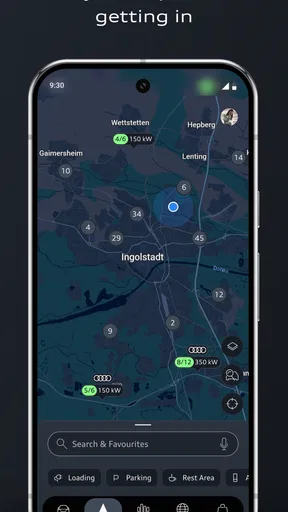
Now consider a less tidy situation. I am away from home and cannot remember exactly where I left the Audi. This is the kind of moment in which a manufacturer-specific app can feel more valuable than a generic notes app or a paper reminder. I open the vehicle-focused service area, look for the information that helps me orient myself, and then continue on foot or return to the car. The benefit is not dramatic; it is the removal of a small but irritating problem.
For a household with more than one Audi-related task, the app can also act as a shared mental checklist, even if the actual account and vehicle handling remain personal. I would still avoid assuming that another person should use my account casually. A better habit is to decide who manages the vehicle information and to keep the setup consistent. That prevents the app from becoming confusing when several people use the same car.
What the experience does well
The strongest part of myAudi is its focus. It is not asking me to describe my car manually or interpret a generic vehicle category. Audi is the developer, and the app is built around Audi drivers and Audi connect services. That gives the information a level of relevance that general-purpose apps often cannot match.
The second strength is continuity. A normal alternative might involve a manufacturer website for ownership information, a separate application for connected services, a calendar for maintenance reminders, and a map tool for finding a parked vehicle. Even if those alternatives are individually capable, they make me remember where each piece of information lives. myAudi has a better chance of becoming the starting point for the whole ownership workflow.
The third strength is that it encourages a calmer ownership routine. I can check before acting rather than discovering a problem at the least convenient moment. That is especially useful for drivers who like to prepare for trips, keep maintenance tasks visible, or make better use of connected features instead of forgetting they exist.
The audience response is also notable. The app has an average rating of 4.8 from around 106 thousand ratings, with over 1 million installs. Those figures do not guarantee that every vehicle or account experience will be identical, but they do suggest that the basic idea is resonating with a substantial number of Audi users. I would treat that as encouraging evidence, not as a reason to skip the setup checks.
Where myAudi is less convincing
The main limitation is dependence on context. If I do not drive an Audi, the app has little reason to stay on my phone. If I own several brands and want one neutral dashboard, myAudi may feel too narrow. A universal vehicle app could be the better choice for a mixed household, even though it will not provide the same Audi-specific focus.
There is also a difference between having an app installed and having a smooth connected workflow. Account access, vehicle association, and service availability all matter. When something does not appear as expected, the problem may not be the screen itself; it may be the relationship between the account, the vehicle, and the connected service. That can make troubleshooting feel less straightforward than using a simple standalone utility.
I also would not choose it as my primary navigation app merely because it belongs to the car manufacturer. Dedicated navigation tools tend to be better when my only goal is route planning, traffic awareness, or exploring places. myAudi makes more sense before and around the journey, where ownership information and connected services matter. That boundary keeps my expectations realistic.
Another trade-off is attention. The app can gather useful ownership functions, but a larger collection of functions can also mean more browsing. My advice is to build a small routine around the tasks I actually perform. I would avoid opening every menu during the first session and instead identify the two or three areas that answer my regular questions. That makes the app feel like a tool rather than another dashboard demanding maintenance.
Version, access, and long-term use
The current version is 5.7.0, and the app requires at least iOS or Android version 12. That requirement is worth checking before installation, particularly if I keep an older phone in the car or use a secondary device for vehicle tasks. The app costs nothing to download, and its Everyone age rating makes it straightforward for a broad household audience, but the real qualification is still whether my phone and Audi setup support the experience I want.
I would also think about phone changes before relying on the app for an important trip. If I replace my phone, change accounts, or hand the vehicle to another regular driver, I would verify the app while parked and confirm that the vehicle still appears correctly. This is a small operational habit, but it prevents a common failure: assuming that a previously working setup will automatically feel identical after an account or device change.
For long-term use, I see the app as most valuable when it becomes part of a repeatable rhythm. I would check it before significant trips, use it when an ownership question comes up, and review the relevant service area when maintenance needs planning. I would not open it every day without a reason. That balance keeps the app useful without turning it into a source of unnecessary screen time.
One subtle advantage is the way it can improve conversations with a service professional. If I use the app to organize what I noticed and when I noticed it, I can arrive with a clearer question instead of a vague description. It does not replace professional diagnosis, but it can improve the handoff from my observation to the person who needs to act on it.
My recommendation after following the complete flow
After moving from a parked car to a planned action, I found the app easiest to recommend to an Audi owner who wants one official place for vehicle-related services and Audi connect features. It is particularly suitable for someone who likes to prepare before driving, wants a closer connection between the phone and the car, or often forgets where ownership information is stored.
I would be more cautious recommending it to a driver seeking a brand-neutral tool, a pure route planner, or a basic reminder app. Those needs are better served by alternatives designed around multiple manufacturers or a single narrow task. The value here comes from integration with Audi, so removing that context removes much of the reason to use it.
My final outcome is favorable but practical rather than enthusiastic for its own sake. myAudi does not make every ownership task disappear, and connected workflows can still have handoffs that require patience. However, it gives Audi drivers a sensible starting point for checking, preparing, and deciding what to do next. If you own an Audi, install it while the car is parked, complete the vehicle setup carefully, and judge it by whether it shortens your real ownership routine. For that audience, it is a worthwhile free companion; for everyone else, it is simply too tied to the Audi experience to be a useful general vehicle app.
Privacy and Permissions
See what permissions an app requests and how it handles your data.
- Identity
- find accounts on the device
- Calendar
- read calendar events plus confidential information
- Contacts
- find accounts on the device, read your contacts
- Location
- approximate location (network-based), precise location (GPS and network-based)
- Phone
- read phone status and identity
- Camera
- take pictures and videos
- Microphone
- record audio
- Wi-Fi connection information
- view Wi-Fi connections
- Device ID & call information
- read phone status and identity
- Other
- view network connections, create accounts and set passwords, pair with Bluetooth devices, access Bluetooth settings, change network connectivity, allow Wi-Fi Multicast reception, connect and disconnect from Wi-Fi, expand/collapse status bar, control flashlight, full network access, control Near Field Communication, run at startup, control vibration, prevent device from sleeping
Verdict
Strengths of myAudi
- Remote vehicle controls make checking and managing your car convenient.
- Service reminders help you keep track of maintenance appointments and deadlines.
- Digital vehicle information is easier to access than searching through paper documents.
- Charging features are useful for monitoring compatible electric Audi models.
- Dealer and roadside assistance details are readily available when needed.
Limitations of myAudi
- Many features require a compatible Audi model and may not work on older vehicles.
- Remote commands can be delayed depending on network coverage and vehicle connectivity.
- Some functions may require an active Audi connect subscription.
- The app can consume extra battery when notifications and location services stay enabled.
- Account setup and vehicle verification may feel lengthy for first-time users.
Similar Picks in This Category
View All
Android Auto
Google LLC4.1

maxim — order a taxi & food
PT. SITO4.7

Штрафы ГИБДД: проверка с фото
Pays LLC – Штрафы ГИБДД4.7

Номерограм – проверка авто
Авто Ассист4.8

Дром Авто
Дром4.9

Frequently Asked Questions
What is myAudi, and what can I use it for?
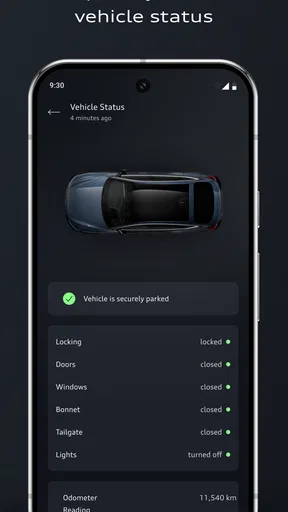
myAudi is Audi’s official companion app for compatible vehicles and connected services. After signing in with an Audi account and adding your car, you can review vehicle information, check selected maintenance details, locate your parked vehicle, manage charging on supported electric models, and view or control certain remote functions. The exact tools available depend on your Audi model, equipment, country, and active connected-services subscription.
Can myAudi remotely lock, unlock, or start my Audi?
Remote controls are available only on supported vehicles and in selected markets. Depending on the model and configuration, myAudi may let you lock or unlock the doors, check whether the vehicle is secured, activate climate functions, or manage charging. Remote engine starting is not universally supported, and many actions require security verification, an active subscription, mobile coverage, and a vehicle that is properly connected to Audi’s online services.
Does myAudi support electric and plug-in hybrid vehicles?
Yes, myAudi includes features designed for compatible Audi electric and plug-in hybrid vehicles. These can include viewing battery status, checking estimated range, monitoring charging progress, setting charging schedules, and preconditioning the cabin. Charging options vary considerably by vehicle generation, charger, region, and software version. Before downloading, owners should confirm that their specific model and market support the functions they want to use.
Is myAudi free to download and use?
The myAudi app can generally be downloaded without paying an app-store fee, but not every connected feature is necessarily free. Some services may require an eligible Audi vehicle, an Audi account, activation through a dealer, or a paid Audi connect subscription after an introductory period. Availability and pricing differ by country, model, and contract, so check the terms shown in your local Audi account before relying on remote services.
What information and permissions does myAudi require?
myAudi normally requires an Audi account and vehicle identification details to connect the app with your car. Depending on the features you use, it may request access to location, notifications, Bluetooth, mobile data, and device security functions. Location can help with vehicle finding and navigation-related tools, while notifications support charging or vehicle alerts. Review the app’s privacy policy and permission settings if you have concerns about personal or vehicle data.
